シティーマンスリー東陽町
東京都江東区東陽1丁目35-6
ご入居中のご案内
快適にお過ごしいただくためにこのページをご活用ください。

東京都江東区東陽1丁目35-6
快適にお過ごしいただくためにこのページをご活用ください。
| 月 | 火 | 水 | 木 | 金 | 土 |

|

|
 隔週水曜 |
|

|
エレベーター降り右側扉より出て左側に専用ゴミ置場がございます。
ごみは収集の当日、朝8時までにお出しください。
前日夜等にはお出しにならないでください。
粗大ごみ 江東区清掃事務所 03-3644-6216
NHK受信料、電話回線等お客様ご自身でご契約された場合、ご退出日までに解約の手続きを行ってください。
喫煙したことにより天井やクロスにタバコのヤニが付着したり、匂いがする場合は程度の拘わらずお客様の費用によって原状回復させていただきます。
原状回復の費用はクロス張替え代、ルームクリーニング代、エアコン内部洗浄代を含むものとします。
1.電気、ガス、水道の使用量について一般的な常識の範囲を超える使用をした場合。
2.鍵を紛失、破損した場合。
3.故意または過失による設備,備品の破損、毀損、汚損が生じた場合。
また帰宅時に鍵が開かない場合はドアを少し引きながら鍵を開けてください。
弁償金5,500円を頂戴いたします。
Wi-Fi送受信機器をお持ちの方は無線LANルーターをご利用ください。
ご利用可能状態で設置しております。
「SSID」「暗号化キー(パスワード)」はルーター本体側面に記載しておりますのでご確認ください。
【RESET】ボタンは決して触れぬ様お願いします。
1,以下の写真のようにLANケーブルをルーター本体【INTERNET(青)】からONU接続部へ、ルーター本体及びONUの電源アダプターをコンセントへ二つ共接続してください。
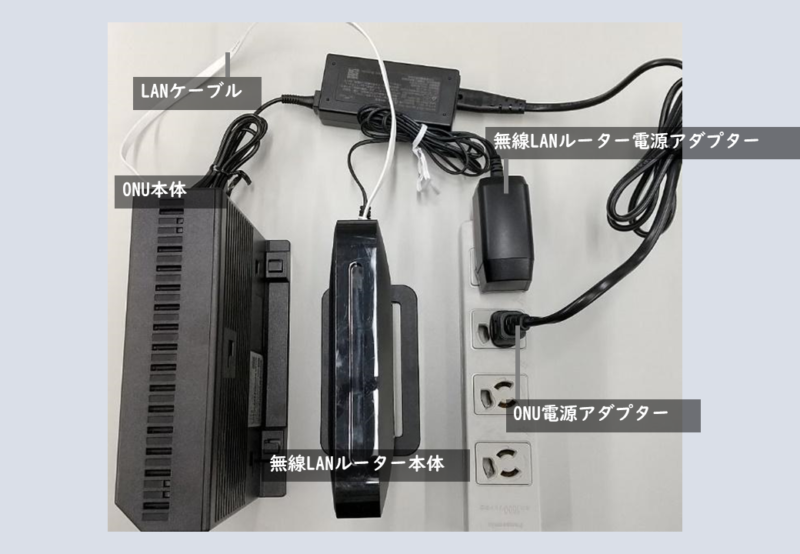
※【LAN1~3】はパソコン等と優先接続する為の物です。

2,利用可能状態まで5分程お時間が掛かります。
【POWER(赤)】、【WIRELESS(緑)】のランプが点灯しましたらご利用可能な状態です。【WIRELESS(緑)】はご使用環境等によりランプの点き方が変わります。

3,ルーター本体側面に「SSID」「暗号化キー(パスワード)」が記載されています。
Wi-Fi送受信機を操作し当SSIDを選択、暗号化キー(パスワード)を入力し接続して下さい。

Q.テレワークでのPC利用の際にWEB会議等が止まってしまう・・・。
A・Wi-Fiでのご使用は電波状況等により安定しない場合がございます。
安定した接続にはLANケーブルとPCからルーター【LAN1~3】部ないしは壁面接続部に直接接続を推奨しております。
Q.Wi-Fiが繋がらない・・・。
A1.LANケーブルが接続されていない場合がございます。一見接続されている様に見えても、しっかりと置くまで差し込まれているか力強くご確認ください。
A2.ルーター本体背面のモードスイッチが「WB」になっておりませんか??「AP」モードでご使用ください。
・インターネット接続に関するお問合せは当社へご連絡をお願いします。
給湯器の電源をご確認の上、ガスメーターが正常に作動しているかご確認をお願いします。
赤いランプが点灯している場合には復旧作業が必要です。
器具栓を閉じるか、運転スイッチを切り、すべてのガス機器を止めてください。 屋外の機器も忘れずに。
復帰ボタンのキャップを手で左に回し、キャップを外してください。
復帰ボタンを奥までしっかり押して、表示ランプが点灯したらゆっくり手を離します。
約3分間お待ちください。
ブレーカーをご確認いただき、ブレーカーがおちていないかご確認ください。
上記で解決しない場合、シティ・ハウジングトラブルサポートへご連絡ください。
0120-973-029
・エアコンからポンポン音がする場合、ドレンホースから外気が流入することで発生する音で故障ではありませんので、まずキッチンの換気扇をOFFにしていただき、室内の吸気口を開けてください。
・床に使用直後の熱い鍋やフライパン、アイロン、火のついたタバコ等を直接おかないでください。
焦げ跡がついた場合は別途修繕費がかかります。
・ご入居中の室内の清掃はお客様自身でお願いします。
・排水口に油や生ごみを流さないでください。
・油等で汚れた場合は速やかにふき取り、排水溝やコンロは定期的にお掃除をお願いします。
・洗剤はサービス品となりますので設置品使用後、必要な場合はお客様でご購入ください。
・ご自身で浄水器を設置する場合、ご退去の際に浄水器を取り外し、吐水口を元の状態に戻していただきますようお願い致します。
・髪の毛を排水口に流すと、詰まりの原因なりますのでお止めください。
・カビ発生の防止の為、使用後はよく換気し、お客様自身で定期的お掃除をお願いいたします。
・掃除用の洗剤はサービス品となりますので設置品使用後、必要な場合はお客様でご購入ください。
・トイレットペーパー以外のものを流すと、排水管の詰まりの原因となりますのでお止めください。
・トイレットペーパーはサービス品となりますので設置品使用後、必要な場合はお客様でご購入ください。
・ご入居中、電球、蛍光灯が切れた場合は弊社へご連絡ください。日程を調整し交換に伺います。
・ご入居中の郵便受けはお客様で管理をお願いいたします。退出後の郵便物は弊社では一切の責任を負いかねます。
お客様自身での転送、転居のお手続きをお願いいたします。
・ペットの持ち込みは固く禁止しております。発覚した場合は違約金を請求させていただきます。
・近隣ご入居者様の迷惑となる行為(騒音、共用部での喫煙、ゴミのポイ捨て)はお止めください。
・ご入居中にマンション管理会社より消防設備点検や排水管清掃をさせていただく場合がございますのでご協力お願いいたします。
| Mon | Tue | Wed | Thu | Fri | Sat |

|

|
 隔週水曜 |
|

|
エレベーター降り右側扉より出て左側に専用ゴミ置場がございます。
ごみは収集の当日、朝8時までにお出しください。
前日夜等にはお出しにならないでください。
粗大ごみ 江東区清掃事務所 03-3644-6216
If you have made a contract for NHK reception fees, telephone lines yourself, please complete the cancellation procedure before your departure date.
Regardless of the degree, we will restore it to its original state at the customer’s expense. The cost of restoration to the original state includes the wallpaper replacement fee,
room cleaning fee, and air conditioner internal cleaning fee.
1.If the amount of electricity, gas, or water used exceeds the range of common sense.
2.Lost or damaged key.
3.In the event of intentional or negligent damage, damage, or defacement of facilities and fixtures.
Also, if the key can not open the door when you return home, pull the door slightly and use the key to open it.
Guests holding network electronic devices please use indoor wireless routers.
The router has been set to a directly usable state.
“SSID(ID)” and “encryption key (password)” are listed on the side of the router.
Please do not touch the reset button [RESET], as the network will become unusable.
1, Please follow the photo below, insert both ends of the network cable into the router’s socket [INTERNET (blue)] and the ONU machine’s socket, and confirm that the router and ONU machine are connected to power.
※The LAN1-3 (excluding blue) socket is used to connect electronic devices.
2, It takes about 5 minutes to reach the usable state.
After the indicator lights of 【POWER(red)】 and 【WIRELESS(green)】 light up, they can be used.
Depending on the usage environment, the 【WIRELESS(green)】 may not light up at times.
3, The side of the router body is written with “SSID(ID)” and “encryption key (password)”.
Operate the electronic device, select the correct corresponding SSID, enter the encryption key (password), and connect.
Q: When using computers for telecommuting or web conference, the network will get stuck.
A: According to the radio condition, Wi-Fi may experience unstable states.
For a stable connection, it is recommended to use a network cable to connect the 【 LANI~3 】 socket of the electronic device and router.(or wall network socket)
Q: Wi-Fi cannot connect.
A1: Please confirm if the network cable is firmly plugged in. Sometimes the network cable may seem to be plugged in, but it is not actually firmly plugged in. Please firmly plug in both ends of the network cable.
A2: Is the mode switch on the back of the router in “WB” mode?? Please adjust to “AP” mode for use.
・If you have any questions about the network connection, please contact our company.
Exit the elevator and go through the door on the right. The designated garbage disposal area is on your left.
Please put out your garbage by 8:00 AM on the day of collection.
Please do not put out your garbage the night before.
Combustible waste: Mondays and Thursdays
Non-combustible waste: Every other Wednesday
Containers, packaging, and plastic waste: Saturdays
Recyclable waste: Tuesdays
Bulky waste: Koto Ward Cleaning Office 03-3644-6216
For details and sorting information, please check the Local Government Cleaning Bureau website.
Please confirm whether the water heater is turned on first, and then confirm whether the gas meter is operating normally.
Restart operation is required when the red light is on with gas meter.
(Gas meter is outside the entrance door, room number is written on the gas meter)
1.Close the gas valve, cut off the switch, and turn off all gas operation related machines. Don’t forget the machines outside the house.
2.Twist the cover of the reset button to the left by hand and remove the cover.
3.Press the reset button inward and release it slowly after the indicator light is on.
4.Wait about 3 minutes.
Please confirm the switch to see if the electric switch is pulled down.
If the above steps do not solve the problem, please contact the Cityhousing Emergency Center.
Tel 0120-973-029
・If the air conditioner makes a noise, it is caused by the inflow of outdoor air from the drain pipe. It is not a malfunction. First, turn off the ventilation fan in the kitchen and open the air intake in the room.
・Do not place hot pans, frying pans, irons, lighted cigarettes, etc. directly on the floor immediately after use. If there are scorched marks, an additional repair fee will be charged.
・Please clean the room by yourself during your stay.
・Do not pour oil or food residues into the drain.
・If oil, etc. gets on it, wipe it off immediately, and clean the drain and stove regularly.
・Detergent is a service item, please purchase it yourself if necessary after use light.
・Please do not draining hair into the drain, it may cause clogging.
・To prevent the occurrence of mold, please ventilate well after use and ask for regular cleaning by yourself.
・Detergent is a service item, please purchase it yourself if necessary after use light.
・Do not flush items other than toilet paper to avoid clogging the drain.
・Toilet paper is a service item, please purchase it yourself if necessary after use light.
・Please contact us if the light bulbs or fluorescent lights go out during your stay. We will adjust the schedule and exchange it.
・Please manage your mailbox well during your stay. About items and emails delivered after check-out, we are not responsible for management.
Please handle the address change procedures yourself.
・Pets are strictly prohibited. If the regulations are violated, we will charge a penalty for breach of contract.
・Please refrain from any behavior that may cause inconvenience to nearby residents (noise, smoking in public areas, littering).
・During your stay, the condominium management company may inspect fire-fighting equipment and clean drains, so please cooperate with us.
| 周一 | 周二 | 周三 | 周四 | 周五 | 周六 |

|

|
 隔週水曜 |
|

|
エレベーター降り右側扉より出て左側に専用ゴミ置場がございます。
ごみは収集の当日、朝8時までにお出しください。
前日夜等にはお出しにならないでください。
粗大ごみ 江東区清掃事務所 03-3644-6216
如果客人自行与NHK、电话公司签署了契约的话,请务必在退宿之前办理解约。
原状回复的费用含有墙纸交换费用、房间清扫费用、空调内部洗净费用。
1.水电、煤气的使用量超过一般正常范围的情况。
2.丢失了钥匙或钥匙有破损的情况。
3.由于故意或过失造成的设备破损、毁坏、弄脏的情况。
还有回家时打不开门的情况下,请稍微用力拽着门把手再用钥匙开门
持有网络电子设备的客人请使用室内的无线路由器。
路由器已经设置为直接可使用的状态。
「SSID(网络ID)」「暗号化キー(密码)」记载在路由器机身的侧面。
请千万不要触碰重启键按钮【RESET】,网络会无法使用。
1, 请和下面的照片一样,将网线两端插入路由器的插口【INTERNET(蓝色)】和ONU机器的插口之间、确认连接好路由器和ONU机器的电源。
※【LAN1~3】(蓝色以外的)插口是用来连接电子设备的。
2, 到可利用状态大约需要5分钟左右的时间。
【POWER(红色)】、【WIRELESS(绿色)】的灯亮起后便可以使用。
【WIRELESS(绿色)】根据使用环境等不同,亮灯方式也不同。
3, 路由器本体侧面写着“SSID”和“加密密钥(密码)”。 操作电子设备,选择正确对应的SSID,输入加密密钥(密码)后连接。
Q. 远程办公使用电脑时,网络会议时网络会卡顿… 。
A・Wi-Fi的使用可能会根据电波状况不同有时出现不稳定状态。
为了稳定的连接,建议使用网线将电子设备和路由器的【LANI~3】插口部分或墙面插口直接连接。
Q. Wi-Fi无法连接・・・。
A1.请确认网线是否有插牢固。有的时候网线好像插着但其实并没有插牢固,请用力插紧网线两端。
A2.路由器本体背面的模式开关处是否为「WB」模式?? 请调整为「AP」模式使用。
・关于网络连接情况的疑问可以和本公司进行咨询。
出電梯後,從右側的門出去。指定的垃圾處理區就在您的左側。
請在垃圾收集日早上 8:00 前將垃圾放在路邊。
請勿在前一天晚上放置垃圾。
可燃垃圾:週一和週四
不可燃垃圾:隔週週三
容器、包裝和塑膠垃圾:週六
回收垃圾:週二
大件垃圾:江東區清潔事務所 03-3644-6216
詳情及分類信息,請查看地方政府清潔事務所網站
请先确认热水器的电源是否打开、再确认煤气表是否正常运作。
煤气表的红色的灯亮着的情况下需要重启操作。
(煤气表在入口门的外侧,房间编号有写在煤气表上)
1.关闭煤气管道、关掉煤气开关、关掉所有和煤气运作相关机器。 屋外的机器也不要遗漏。
2.用手向左拧回复按钮上的盖子,取掉盖子。
3.向内按紧复归按钮、指示灯亮了以后慢慢松开手。
4.等待大约3分钟。
请确认电闸,看电闸是否拉下来了。
按照以上操作也没有解决问题的情况下,请联络Cityhousing的紧急联络中心。
0120-973-029
・如果空调里发出砰砰的声响,那是室外空气从排水管逆流入造成的,并非故障。 首先请关掉厨房的换气扇,再打开房间墙壁上的换气口。
・使用过后的热锅、煎锅、熨斗、点燃的香烟等请勿直接放在地板上。 如果有烧焦痕迹,将另行收取维修费用。
・入住期间中请客人自行打扫房间。
・请勿将油或食物残渣直接倒入下水道。(请把垃圾过滤网套在排水口的垃圾过滤器上)
・如果有油污等,请立即擦拭干净,并定期清洁下水道和炉灶。
・洗涤剂为免费赠品,用光之后如有需要请自行购买。
・请不要将头发直接冲入下水道,会造成下水道堵塞。
・为了防止浴室发霉,使用后请多通风换气,自己定期清扫浴室。
・浴室清洁剂为免费赠品,用光之后如有需要请自行购买。
・请勿将厕纸以外的物品冲入马桶下水道,会造成排水管堵塞。
・卫生纸为免费赠品,用光之后如有需要请自行购买。
・住宿期间灯泡或荧光灯熄灭时,请与我们联系。我们会调整日程给您交换。
・入住期间,请自行管理好邮箱,扔掉不要的传单。退住以后送到的物品,本公司不负责回收。
请客人自行办好住址变更的手续。
・公寓严禁携带宠物。违规时我们将收取罚款。
・请避免任何可能给附近居民带来不便的行为(噪音、在公共区域吸烟、乱扔垃圾)。
・在您入住期间,公寓管理公司可能会检查消防设备和清洁排水管,届时请配合我们工作。
 入居にあたって確認事項(必ずご確認下さい)
 インターネットについて
 ゴミについて
 備品について
 Q&A
 室内の注意点